
How to Instantly Check If Your Resume Matches a Job Description
Most candidates submit their resume without ever checking it against the job description. Here's a 3-step way to see your match score, missing keywords, and skill gaps in under a minute — for free.
You found a job that looks like a real fit. You spend twenty minutes on the cover letter, double-check your contact details, and hit "Submit."
But the resume you attached? It's the same one you sent to the last six companies.
That single decision — reusing the same resume across different roles — is quietly responsible for more rejections than typos, gaps in employment, or even being underqualified. And the worst part is that almost nobody checks for it before applying.
Why the Same Resume Can't Win Every Job
Every job description is, in effect, a scoring rubric. It tells you — and the software screening your application — exactly what the employer is looking for:
- The specific tools, platforms, and certifications they expect
- The seniority and scope of experience they consider a match
- The exact language they use to describe the role's responsibilities
An Applicant Tracking System (ATS) reads your resume against that rubric using keyword matching — comparing the words on your resume to the words in the posting, often as literal text strings.
This means two resumes describing the same experience can score completely differently, depending on whether they use the employer's language:
| Job description says | Generic resume says | Result |
|---|---|---|
| "Cross-functional stakeholder management" | "Worked with other teams" | Low match |
| "Data-driven roadmap prioritization" | "Used data to make decisions" | Low match |
| "Salesforce administration" | "CRM tools" | Low match |
To a person, both columns sound similar. To an ATS, only one of them scores.
If your resume was written once and sent everywhere, it's statistically aligned with no specific job — which is the opposite of what you want when a recruiter (or a filter) is deciding whether to move you forward.
The 3-Step Way to Check Your Resume vs. Job Description Match
Here's the good news: you don't have to guess whether your resume is aligned. You can check it directly, in about the time it takes to read this section.
Step 1: Paste the Job Description
Copy the full job posting — not just the title, the entire description including responsibilities and requirements. This is the rubric your resume will be measured against, so the more complete it is, the more accurate the comparison.
Step 2: Upload Your Resume
Add the resume you're planning to send for this specific job. If you've been using the same file for multiple applications, this is the moment that gets exposed.
Step 3: Read Your Match Score, Missing Keywords, and Skill Gaps
Within seconds, you should see:
- An overall match score between your resume and the job description
- The specific keywords the job description uses that your resume is missing
- A skill gap analysis showing which required skills aren't represented
- Notes on formatting issues that might block the ATS from parsing your resume correctly
That's it. Three steps, and you go from guessing to knowing.
The Step Most Candidates Skip Entirely
Here's the uncomfortable truth: most job seekers have never done this check — not once.
They write a resume, polish it, feel good about it, and send it to dozens of postings without ever asking: does this document, as written, actually match what this employer is asking for?
It's not because they don't care. It's because, until recently, there was no fast way to find out. Manually comparing a resume against a job description — line by line, keyword by keyword — is tedious enough that almost no one does it consistently, even though it takes less time than writing a single cover letter.
The candidates who do check this before applying have a structural advantage. Not because they're more qualified — because they know, before they hit submit, whether their application is even in the running.
What's Actually Being Measured: Four Dimensions of a Match Score
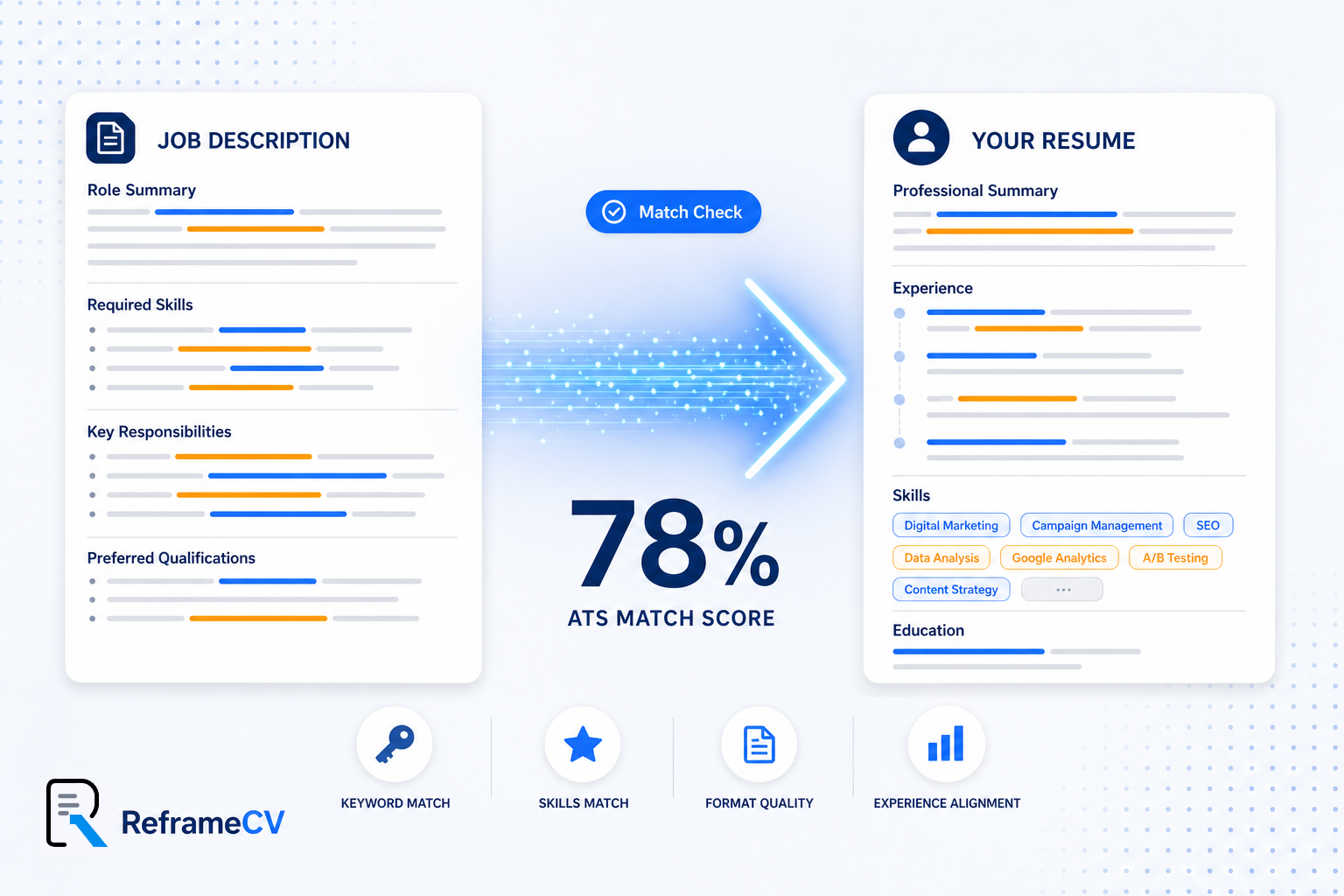
A meaningful match score isn't a single number pulled from nowhere. It's a combination of distinct signals, each measuring something different about how your resume relates to the job description.
1. Keyword Match
The most heavily weighted factor. How many of the job description's specific terms — tools, methodologies, certifications, responsibilities — appear in your resume, using the same or near-identical phrasing? This is the foundation of keyword matching and the single biggest lever for moving your score.
2. Skills Match
A more structured view of the gap above. This dimension isolates the hard and soft skills listed in the job description and checks each one individually against your resume — producing a clear list of what's covered and what's missing. See our breakdown of skill gap analysis for how this works in detail.
3. Format Quality
Even a perfectly worded resume can score poorly if the ATS can't read it. Tables, columns, text boxes, headers/footers, and non-standard section titles can cause resume parsing to fail silently. ATS-friendly formatting ensures the content you worked hard on actually gets scored at all.
4. Experience Alignment
Beyond keywords and skills, this dimension looks at whether your seniority, scope, and career trajectory match what the role expects. Two resumes can list identical skills and still score differently here — read more about experience alignment and why it matters.
Together, these four dimensions turn a vague feeling — "I'm not sure if I'm a good fit for this" — into a specific, actionable picture.
The Tool That Runs This Check Instantly
This is the exact comparison ReframeCV's free ATS Match Score Checker was built to run.
Paste in a job description, upload your resume (or paste the text), and within seconds you get:
- An overall match score from 0–100
- The specific keywords from the job description your resume is missing
- A skill-by-skill gap analysis
- Feedback on formatting issues that could affect ATS parsing
- An assessment of how well your experience aligns with the role's seniority and scope
There's no account to create and no document to save anywhere first — it's a direct, no-signup comparison between the resume you have and the job you're considering. You get 3 free analyses per day, which is more than enough to check your resume against a handful of postings before deciding where to focus your energy.
If you're applying to multiple roles, run each job description through the checker with the same resume first. The differences in your score across roles will tell you a lot about which postings are actually a strong fit — before you spend time tailoring anything.
From Diagnosis to Fix
A match score is a diagnosis. The next question is what to do with it.
If your score comes back low, you now have a specific list: missing keywords, missing skills, and formatting issues — instead of a vague sense that "something's off." For a single application, the fix is usually straightforward:
- Add the missing keywords where they're true to your experience
- Reframe existing bullet points using the job description's exact language for any skill gaps that are really just phrasing differences
- Fix any formatting issues flagged in the format quality section
- Reorder or reframe experience to improve experience alignment with the role's seniority and scope
If you're applying to many roles — and doing this manually for each one starts to feel like a second job — that's exactly the problem ReframeCV's Job-First Approach was designed to solve. Instead of starting from a fixed resume and patching it for each posting, you start from the job description itself, and the resume is built around it from the ground up. The match score checker tells you what's missing; the Job-First builder is how you close that gap for every application without doing it by hand each time.
A Habit That's Worth Thirty Seconds
Before your next application, ask yourself:
- Have I checked this resume against this specific job description — not just read it over?
- Do I know which keywords from the posting are missing from my resume?
- Am I aware of any skill gaps the employer will see, or am I assuming I'm covered?
- Could this resume's formatting be silently breaking how an ATS reads it?
If you can't answer these with confidence, you're applying blind — and so is almost everyone else, which is exactly why this small check creates an outsized advantage.
Check your resume against any job description for free — use ReframeCV's ATS Match Score Checker.